Best Wireless Internet for Boats on the Go: Reliable Onboard Connectivity
Finding solid wireless internet while cruising can be challenging, but a smart mix of portable routers, bridges, and USB adapters can deliver dependable onboard connectivity. This guide highlights five strong options that are well-suited for boats, ranging from compact travel routers to versatile WiFi-to-Ethernet bridges. Each selection is evaluated for speed, portability, and ease of setup in marine environments, helping you stay connected during voyages, dockside stays, and remote anchorages.
| Product | Key Benefit | Connectivity Focus |
|---|---|---|
| TP-Link Ultra-Portable Wi-Fi 6 AX1500 Travel Router TL-WR1502X | Fast dual-band performance with multi-mode versatility | Wi-Fi distribution, hotspot, extender |
| TP-Link AC750 Wireless Portable Nano Travel Router TL-WR902AC | Compact travel-ready with multiple modes | Router, hotspot, bridge, range extender |
| NETGEAR Nighthawk M1 4G LTE WiFi Mobile Hotspot | Secure, flexible cellular connectivity with multiple devices | Mobile hotspot, SIM-based data |
| BrosTrend AC1200 WiFi to Ethernet Adapter | Turns wired devices into wireless clients | WiFi to Ethernet bridge |
| BrosTrend WiFi 6 AX3000 to Ethernet Adapter | High-speed WiFi to wired devices with Gigabit port | WiFi to Ethernet bridge |
Note: The five selections below are chosen for marine usability, flexibility, and compatibility with common boat WiFi scenarios, including hotel Wi-Fi sharing, marina networks, cellular hotspots, and on-demand tethering. Each product section includes a direct Amazon link for quick access, while the introduction’s summary table presents a navigation-friendly overview without external links.
TP-Link Ultra-Portable Wi-Fi 6 Travel Router TL-WR1502X

The TL-WR1502X is a compact travel router offering AX1500 dual-band performance, delivering up to 1201 Mbps on the 5 GHz band and 300 Mbps on 2.4 GHz. It is designed for portable use, with a durable, no-moving-parts build that travels easily in a boat bag or life raft locker. Its multi-mode operation supports Router, Access Point, Range Extender, Hotspot, Client, and 4G Modem modes, enabling onboard internet sharing with hotel, marina, or cellular networks. This flexibility helps crews maintain consistent coverage across cabins and cockpit areas.
On boats, small form factors matter. The TL-WR1502X’s pocket size fits behind cabins or aboard sailboats where space is at a premium. The USB-C power option simplifies power delivery aboard vessels with limited charging outlets, and the Tether App can simplify setup for crew members who need to share a Wi-Fi connection securely with guests or other boats docked nearby.
TP-Link AC750 Wireless Portable Nano Travel Router TL-WR902AC

The TL-WR902AC is a light, pocket-sized travel router that supports multiple modes, including Router, Hotspot, Bridge, Range Extender, Access Point, and Client modes. Dual-band AC750 WiFi provides reliable performance for streaming, navigation apps, and onboard communications when docked or anchored. Its “one switch” design makes it straightforward to switch between modes, which is helpful when moving between marina networks and on-board private networks. It’s well-suited for sharing a stable onboard network with a small crew or family.
For boat use, the compact footprint reduces clutter near navigation gear, and the device’s basic administration is friendly for non-technical crew. When paired with a marina hotspot, it can extend coverage into cabins, head, and galley, while avoiding interference with critical navigational electronics thanks to careful channel selection in 2.4/5 GHz bands.
NETGEAR Nighthawk M1 4G LTE WiFi Mobile Hotspot

The Nighthawk M1 is a robust cellular hotspot designed for areas with cellular coverage. It supports up to 1 Gbps theoretical download speeds, connects up to 20 devices, and offers a secure wireless network anywhere. This is particularly valuable on boats that rely on cellular data when WiFi from marinas or fixed anchors is inconsistent. The M1 supports multiple carriers via SIM and can act as a primary or backup internet source, depending on coverage. It’s especially useful during long passages or anchor stays where satellite options may be unavailable or costly.
Operational considerations for marine use include ensuring the unit remains out of direct spray, using a protective patch to reduce heat exposure, and planning for data plan limits. The M1 enables reliable guest access without exposing the boat’s main router credentials, offering a separate SSID for visitors aboard a vessel.
BrosTrend AC1200 WiFi to Ethernet Adapter
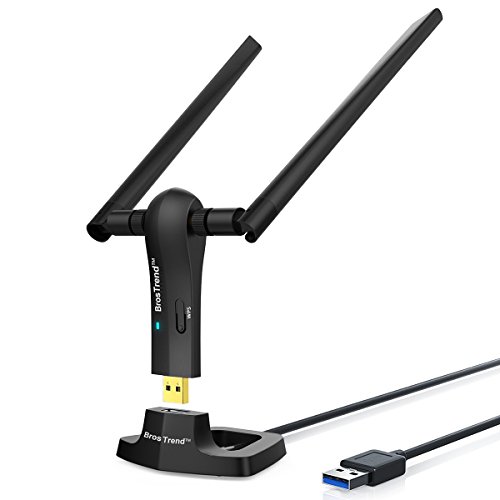
The BrosTrend AC1200 adapter converts a wired Ethernet-enabled device into a WiFi client, or it can provide a bridge for TVs, printers, or smart devices onboard. It supports AC1200 speeds with up to 867 Mbps on 5 GHz and 300 Mbps on 2.4 GHz, complemented by two high-gain antennas. The design includes a USB-powered cradle with a 5-foot extension, enabling flexible placement around a boat’s cabin during voyages. It’s ideal for using a wired marine device (like a smart TV or printer) on a shared marina network when WiFi can be spotty near the hull.
When integrating on a boat, ensure the adapter remains shielded from moisture and placed where its elevated position yields the best signal. It benefits from a steady power source and a nearby router with clear line-of-sight to minimize interference from metal hulls and electronics aboard the vessel.
BrosTrend WiFi 6 AX3000 to Ethernet Adapter

The BrosTrend AX3000 WiFi to Ethernet Bridge brings WiFi 6 performance to wired devices. It includes a Gigabit Ethernet port for fast throughput to smart TVs, gaming consoles, printers, and DVRs aboard boats. With dual-band support and two robust antennas, the adapter aims to provide strong signal capture in marina networks or portable hotspots. The setup is straightforward, with features designed to maximize coverage in metal-rich environments common on boats. This bridge is a strong option for upgrading legacy wired devices to modern, wireless-enabled performance on board.
Buying Guide: Key Purchase Considerations
- Network source compatibility: Determine whether you primarily rely on marina WiFi, cellular hotspots, or hotel network sharing. Choose devices that can operate in Router/Hotspot or Bridge modes to match your source.
- Portability vs. performance: Smaller, travel-focused devices travel easily but may have fewer antennas or ports. Consider a mix of compact routers and a portable cellular hotspot for backup.
- Multi-device management: For crewed boats, a gadget with simple administration and guest network capabilities helps manage access without exposing private networks.
- Power and durability: Look for devices with robust casing and easy power options (USB-C or 12V) to fit boat electrical systems and USB hubs onboard.
- Coverage and interference: Boats have metal hulls that affect signal. Antenna gain, placement, and channel selection are important to minimize interference with onboard systems.
- Security features: Prioritize devices with WPA3 support where possible and the ability to create separate guest networks for guests and other boats at dock.
- Data plans and limits: For cellular hotspots, understand carrier plans, roaming rules, and any fair-use limitations that could affect performance during extended trips.
- Future-proofing: If you expect to upgrade to higher-speed networks or more devices, consider WiFi 6 or WiFi 6E capable options to maximize longevity.
Comparison Snapshot
- Speed: WiFi 6 AX6000-ready options offer faster wireless speeds for internal networks, while AC and N devices provide solid mid-range performance for typical onboard streaming and navigation apps.
- Portability: Travel routers and compact adapters are ideal for small crew boats; larger bridges excel when accommodating several devices on deck or in the salon.
- Cellular vs. marina: Cellular hotspots deliver emergency internet when marina WiFi is weak; routers with multiple modes enable seamless switching between networks.
- Ease of use: For non-technical crew, models with straightforward setup and guest network features reduce confusion on busy passages.
- Reliability: Devices designed for outdoor or marine environments with stable power and protective enclosures help ensure consistent uptime.
Across boats of different sizes, combining a portable travel router with a cellular hotspot and a WiFi-to-Ethernet bridge provides flexible, resilient internet coverage. The pairing enables onboard devices to stay connected whether you are docked in a marina, anchored offshore, or traveling to remote marinas. Consider your crew’s needs, data usage, and space constraints when assembling your marine network kit for reliable wireless internet on the water.