Best Wireless Boat Docking Camera for Easy Mooring and Safe Docking
Answering the common search for a wireless boat docking camera, these picks focus on reliable wireless links, easy mounting on metal surfaces, and clear views for in-slip docking, ramp launches, and trailer setups. Ideal buyers include boat owners who want quick-to-install backups, RVers docking a boat, and trailer users needing a wider field of view without hard-wiring. Below is a concise buying guide, plus five top wireless boat-docking camera options with quick-reference comparisons.
| Product | Best For | Key Advantage | Limitations |
|---|---|---|---|
| AUTO-VOX 7.2″ Wireless Magnetic Backup Camera with Monitor | RVs, boats, trailers needing dual-view | 7.2″ split-screen 1080p monitor | Higher cost; needs metal surface for magnet mount |
| Amouu 1080P Wireless Boat Trailer Camera | Boat docking and ramp prep | Integrated solar/battery option | Range may vary with environment |
| EWAY Wireless Magnetic Hitch Backup Camera | Wide-range towing and hitching | Strong magnets; up to 100 ft range | Some users report limited field of view |
| DVKNM 2 Magnetic Solar Wireless Backup Camera | Temporary or portable setups | 3-min DIY setup; solar charging | Limited to non-wiring installs |
| HEECOOMI 4 Magnetic Solar Wireless System | Multi-angle monitoring on larger rigs | 10.1″ IPS touchscreen; four cameras | More complex install and higher upfront cost |
All five selections prioritize easy, tool-free mounting, reliable wireless links, and clear video for docking, mooring, and backing up with confidence. The following sections detail each product, who it’s best for, and practical considerations to help you choose.
AUTO-VOX 7.2″ Wireless Magnetic Backup Camera
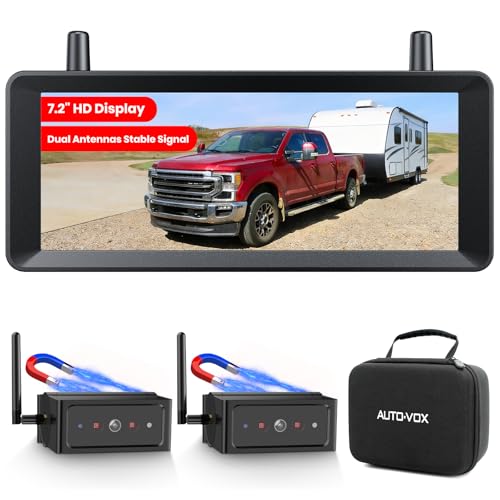
Best for boat docking and RVs that need dual-view assistance. The system features a true 1-minute install with no drilling or wiring required. A strong magnetic base sticks to metal surfaces, with an adhesive plate included for fiberglass or aluminum surfaces. The 7.2″ split-screen 1080P monitor displays two camera angles at once, helping you monitor blind spots while docking or reversing. The dual-antenna setup supports stable wireless video up to 524 ft, reducing lag as you approach a dock or slip.
Who it’s for: boat owners who value a large, integrated display and a flexible install that can move between vehicles. Why selected: the split-view capability, long wireless range, and quick install make it well-suited for maritime docking tasks.
Caution: If you’re mounting on non-metal surfaces, ensure the adhesive plate is placed correctly to secure the camera during movement.
Casoda Wireless Backup Camera

Best for boats and trailers requiring a robust, long-range wireless link. This camera emphasizes a 1080P HD image and a high-strength WiFi signal, claiming improved anti-interference with a 150 ft open-area range. The 5G wireless design aims to reduce lag and maintain a steady feed for precise docking and hitching. It is especially useful when you need a clear, stable feed from a distance away from the dock.
Who it’s for: users who need reliable, longer-range video without a wired installation. Why selected: strong emphasis on interference resistance and high-definition feed suits larger vessels or campsites where signal integrity matters.
Caution: Performance can vary indoors or in obstructed environments where radio signals are attenuated by obstacles.
EWAY Wireless Magnetic Hitch Backup Camera

Best for towing and boat trailer setups where a strong magnetic mount and broad reach are valuable. This system offers up to 100 ft of wireless range in open areas and uses a magnetic mount that’s designed to hold firmly. It delivers HD 1080P video with night-vision support and an auto light sensor for low-light conditions.
Who it’s for: drivers who need a straightforward, sturdy magnetic mount for frequent hitching and docking tasks. Why selected: the combination of strong magnets and a long open-range signal makes it a reliable choice for outdoor docking operations.
Caution: The camera’s field of view can vary; verify the angle to ensure it covers the docking corridor you use most often.
DVKNM 2 Magnetic Solar Wireless Backup Camera

Best for portable or temporary dock setups where a quick, tool-free install is beneficial. It features three minutes DIY installation, a strong magnetic base, and a solar charging option with a Type-C port as a backup. The 2-camera approach is useful for adding a second angle while backing onto a dock or trailer.
Who it’s for: users who want a quick, portable backup solution that can be moved between vehicles or locations. Why selected: fast magnet mount and solar power increase flexibility for intermittent use on boats and trailers.
Caution: Solar charging works best in sunny conditions; consider USB charging in shaded or covered docking areas.
HEECOOMI 4 Magnetic Solar Wireless System

Best for larger vessels or setups requiring multi-angle monitoring. This system includes a 10.1″ IPS touchscreen and four magnetic solar cameras to cover multiple views around a boat, trailer, or yacht. It runs on solar power with optional 12V charging and USB, allowing day and night monitoring.
Who it’s for: boaters needing comprehensive coverage around-the-boat, especially when docking in tight slips or crowded marinas. Why selected: multi-view capability provides a complete situational picture, improving docking precision.
Caution: More cameras mean a larger install footprint and higher initial investment; ensure you have a suitable mounting plan and space for the display and cameras.
Buying Guide: Key Considerations For A Wireless Boat Docking Camera
- Mounting method: Magnetic mounts are quick and adjustable, but ensure a flat, metal surface for best adhesion. Consider adhesive plates for non-metal surfaces.
- Display size and layout: A larger monitor helps when docking in tight spaces. Dual or quad view can reduce blind spots but may require more space.
- Wireless range and interference: Look for dual-antenna designs or 5G/5.8GHz channels to minimize lag and dropouts near marina docks or metal structures.
- Power options: Solar charging provides field flexibility and longer use between trips, but always verify battery life and back-up charging methods in shaded conditions.
- Weather and water sealing: IP67/IP69 or similar ratings ensure operation in spray, rain, or humidity common around boats and docks.
- Video quality: 1080P is commonly sufficient for docking; verify low-light performance and IR/night vision if you dock at night or in shaded slips.
- Expansion and future-proofing: If you expect to onboard extra cameras, choose a system that supports additional views or side cameras.
Frequently Asked Questions
- What’s the easiest way to install a wireless boat docking camera?
Most options use a magnetic mount and require no drilling. Attach to a metal surface or use the included adhesive plate for non-metal surfaces. - Can these cameras work at night?
Yes, many models include night-vision or IR LEDs to improve visibility in low-light docking conditions. - Is a longer wireless range always better?
A longer range helps in open marinas or when backing away from docks, but line-of-sight quality and interference will affect actual performance. - Do I need to power these cameras with solar charging?
Solar charging is convenient for boats that stay parked or used intermittently. USB Type-C charging provides a reliable back-up when sunlight is limited. - Are multi-camera systems worth it for docking?
For large vessels or tight slips, multi-view systems reduce blind spots and give a safer, more complete view around the bow, stern, and sides. - Can I move a magnetic camera between boats?
Yes, magnetic cameras are designed for quick removal and transfer to other metal surfaces, making them convenient for renters or multiple vessels.