Best Marine Touch Screen Monitor Solutions for Outdoor Use
When searching for a marine-grade or outdoor-ready touch screen monitor, you want options that resist dust, water, and sunlight while offering reliable multi-touch input. This guide highlights five durable monitors well-suited for boats, outdoor workspaces, and harsh environments. Each choice targets different needs—compact panels for tight spaces, larger displays for crew dashboards, and portable screens for flexible use. The top picks balance rugged construction with versatile connectivity and intuitive touch performance for Windows, macOS, and Linux users.
| Product | Brand | Best For | Key Benefit |
|---|---|---|---|
| Beetronics 10″ High Brightness Touchscreen | Beetronics | Compact cockpit displays | Sunlight-readable, IP66 front panel |
| cocopar Portable Monitor 15.6″ Touch | cocopar | Travelers and mobile setups | One-cable USB-C power and video; versatile portability |
| 24″ Touchscreen Monitor VA Panel | Dragolftie | Desk setups needing large touch area | Full HD, adjustable stand, multiple inputs |
| CUNPU 27″ Touchscreen Monitor | CUNPU | Home office and workstations | 10-point touch, Nano IPS, wide color |
| InnoView 15.6″ Portable Touch Monitor | InnoView | Travel and mobile work | 10-point touch, protective sleeve, built-in stand |
Beetronics 10-Inch Outdoor Touch Screen
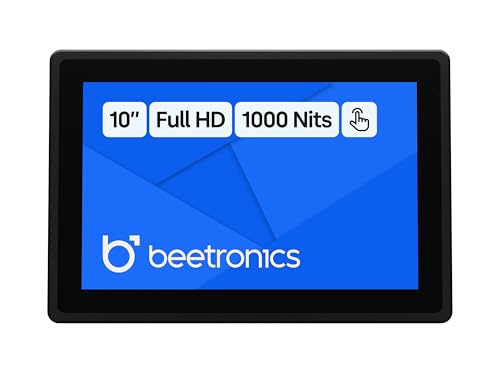
Best for compact, sunlit spaces where a rugged panel is needed. This 10.2-inch display uses Full HD with a high-brightness IPS panel and 170° viewing angles. The capacitive multi-touch supports up to 10 points, protected by tempered glass for durability on boats or outdoor decks. It is designed for Windows, macOS, and Linux with plug-and-play USB touch recognition, simplifying installation on limited mounts. The IP66 front panel adds dust and water resistance for marine environments.
Best for: small pilothouse consoles, sailboats, or outdoor kiosks where space is limited but touch responsiveness matters. Limitation: smaller screen size may feel cramped for complex dashboards.
cocopar 15.6″ Touchscreen Portable Monitor

Best for mobile workstations and remote setups. This 15.6″ portable monitor delivers native touch gestures across macOS and Windows, with tempered-glass durability and a one-cable USB-C connection that handles power, video, and touch signals (where supported). It’s ideal as a secondary screen on the go or when docking a laptop at the helm. Limitation: Apple devices or systems without USB-C DP Alt Mode may require extra cables or adapters for the single-cable setup.
Dragolftie 24-Inch Touchscreen Monitor

Best for desktop-style workstations that require a larger touch area. The 24″ screen features 1080p resolution, a 75Hz-like refresh dynamic, and adjustable tilt/pivot. It includes multiple inputs (HDMI, VGA, and Type-B) and requires a Type-B connection for touch. It’s best chosen for fixed installations in offices or control rooms; avoid this if you operate in devices where touch isn’t supported via Type-B or Apple/Linux environments without compatible ports.
CUNPU 27-Inch Touchscreen Monitor

Best for workstation setups needing a larger touch surface. This 27″ FHD display provides 10-point capacitive touch, VESA mounting compatibility, and multiple input options (HDMI, VGA). Its Nano IPS panel delivers wide color and viewing angles, supporting busy office tasks or design work in bright rooms. Limitation: 27″ size may require more desk space; ensure adequate mounting and ventilation in marine-use environments where heat buildup may occur at higher brightness settings.
InnoView 15.6″ Portable Touch Monitor

Best for travelers and mobile workers who need compression and protection. The 15.6″ IPS panel offers 178° viewing, a durable protective sleeve, and a built-in stand for quick setup. It supports 10-point touch via a USB-C connection on compatible devices, making it a flexible second screen on boats or remote workplaces. Caution: some devices without Power/Video over USB-C may require separate power or adapters to enable touch functionality.
Buying Guide: How to Choose the Right Marine Touch Screen Monitor
What screen size should you pick? Consider workspace constraints and viewing distance. Smaller screens fit tight cockpits; larger screens improve multi-tasking on dashboards. For outdoor use, prioritize IP ratings, brightness, and anti-glare coatings.
Which connections matter? USB-C with power and touch is ideal for modern laptops, while HDMI or VGA can be easier in older systems. Check compatibility with Windows, macOS, and Linux to ensure seamless touch recognition.
How important is touch performance? Multi-touch accuracy matters for gestures like pinch-to-zoom or swiping. Tempered glass adds durability in dusty or damp environments but may affect sensitivity slightly; calibration settings help optimize input.
What about durability and mounting? An IP66 front panel or better protects against dust and water in marine conditions. Consider VESA mounting compatibility for flexible arm or wall setups, especially in compact cabins.
Are portable monitors suitable for boats? Yes, when you need flexible screens for on-deck use or mobile workstations. Ensure the power source and cable management align with your vessel’s electrical setup.
Frequently Asked Questions
- What is IP66 rating, and why does it matter for marine screens?
- Can these monitors work with Linux systems?
- Do all monitors support 10-point touch?
- Is USB-C single-cable connections universal for touch input?
- What mounting options are best for marine use?
- Are these monitors suitable for outdoor glare conditions?
IP66 indicates robust protection against dust ingress and powerful water jets. For boats and outdoor areas, this reduces damage from spray and dust, increasing longevity.
Many of the listed models offer plug-and-play USB touch with Linux compatibility, but some require drivers or specific configurations. Check the product features for Linux support notes.
Most models described advertise 10-point touch, which enables precise multi-finger gestures. Always confirm the number of touch points in the product details.
Single USB-C cables that carry power, video, and touch work on devices that support DP Alt Mode or Thunderbolt. Some laptops may need adapters for full compatibility.
VESA mounts and wall-certified housings offer secure mounting. For small cabins, compact panels with robust IP ratings reduce space conflict and risk of accidental damage.
Monitors with high brightness and anti-glare coatings perform better in direct sun. Look for outdoor or sunlight-readable specifications when choosing a marine display.